Tutorial 4: Difference between revisions
No edit summary |
|||
| Line 2: | Line 2: | ||
==Edit Item page== | ==Edit Item page== | ||
===Things you need to know about Item Pages=== | |||
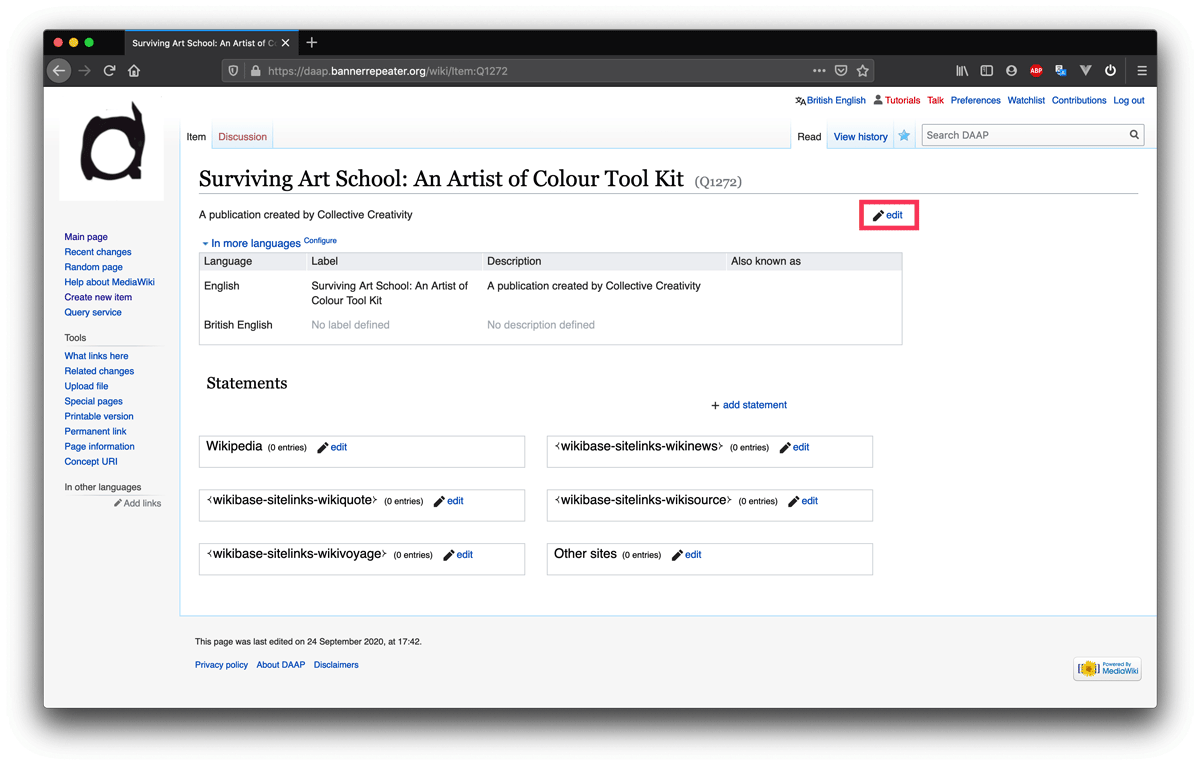
This is what a new Item looks like after it has been created and added to the archive. It is automatically assigned a unique ID number from the database, this number always starts with the letter Q, in this example the unique ID for the publication “Surviving Art School” is Q1272. Once created an ID cannot be changed, but everything else about an Item is editable. | |||
https://daap.bannerrepeater.org/w/images/9/95/Tutorial3_img1.png | https://daap.bannerrepeater.org/w/images/9/95/Tutorial3_img1.png | ||
'''Edit page information:''' You may edit, or add to the basic information entered in the '''[https://daap.network/tutorial_3 Create a new Item tutorial]'''; including Label, Description, and Aliases (alternative names the Item is known as), at any time. | |||
To make a change, simply click on the “edit” button at the upper right corner of the page. When you are satisfied with the changes you’ve made, remember to click “save”. | |||
To | |||
'''Add statements:'''To start adding information to describe different aspects of the item you will add “statements”. This will be familiar to you if you have used Wikidata before. | |||
Each Statement includes two main parts: a Property and a single (or multiple) Values. | |||
The Properties and Values attached to the Item for a published work will typically include its creator(s) and its publisher, as well as its format, binding, material, and physical dimensions. You can also add many further details, such as edition size, ISBN, whether it is available as a digital facsimile, and which collections hold a copy. | |||
Properties are a set of links that connect an Item with different aspects of information about it. The Values corresponding to each Property represent unique information about individual Items in the DAAP. See the table with some examples below: | |||
{| class="wikitable" | |||
|- | |||
! Item | |||
! Property | |||
! Value(s) | |||
|- | |||
| Q1272 | |||
| Instance of | |||
| work | |||
|- | |||
| Q1272 | |||
| title | |||
| Surviving Art School: An Artist of Colour Toolkit | |||
|- | |||
| Q1272 | |||
| creators / contributors | |||
| style="color:#00E;" | Evan Ifekoya, Raisa Kabir, Raju Rage, Rudy Loewe, Said Adrus, Claudette Johnson, Keith Piper | |||
|} | |||
Our team has created a [https://docs.google.com/spreadsheets/d/1PtX5g-T6T8d7GSq7uYNNhPPrbHU91U-GV4aF2W18occ/edit#gid=0 Data Model], which lists the Properties currently available in the DAAP, alongside examples of possible Values, to support you as you build your Statements. You may find it useful to refer back to the data model whenever you are working in the database. You can also navigate to the Data Model via the [https://daap.bannerrepeater.org/wiki/Main_Page Main page], under the heading ‘Data model reference’. | |||
https://daap.bannerrepeater.org/w/images/6/6d/Tutorial3_img2.png | https://daap.bannerrepeater.org/w/images/6/6d/Tutorial3_img2.png | ||
You may only use existing Properties (listed in the Data Model). This is important because we want the database to remain focused and workable. If you feel a Property is missing, please email us (daap [dot] community [at] disroot [dot] org) to discuss your ideas before adding a new one. | |||
You do not need to make use of all the Properties listed here. Choose only those Properties which are relevant to the Item you are creating. | |||
You are not required to add Statements in any specific order. However, the Data Model introduces one approach, of considering Statements in 5 sets relating to: | |||
1. '''how the work is referred to in the world,''' e.g., its title, subtitle, language, and series number; | |||
2. '''the publication event,''' e.g., creators/contributors, publisher, imprint, place and date of publication; | |||
3. '''the material characteristics of the work,''' e.g., its medium, format, binding, height, width, thickness, and the material processes it comprises; | |||
4. '''information about a work’s distribution,''' e.g., its digital facsimiles, distributor links, library links and ISBN; | |||
5. and finally, '''anecdotal histories''' including description, distribution and exhibition history. | |||
You may also find it useful to consider this Example Item page which uses blank Values to demonstrate all Properties which can be used to describe different publication Items. | |||
===Step 1=== | ===Step 1=== | ||
Revision as of 22:50, 30 July 2021
Tutorial 4
Edit Item page
Things you need to know about Item Pages
This is what a new Item looks like after it has been created and added to the archive. It is automatically assigned a unique ID number from the database, this number always starts with the letter Q, in this example the unique ID for the publication “Surviving Art School” is Q1272. Once created an ID cannot be changed, but everything else about an Item is editable.
Edit page information: You may edit, or add to the basic information entered in the Create a new Item tutorial; including Label, Description, and Aliases (alternative names the Item is known as), at any time.
To make a change, simply click on the “edit” button at the upper right corner of the page. When you are satisfied with the changes you’ve made, remember to click “save”.
Add statements:To start adding information to describe different aspects of the item you will add “statements”. This will be familiar to you if you have used Wikidata before.
Each Statement includes two main parts: a Property and a single (or multiple) Values.
The Properties and Values attached to the Item for a published work will typically include its creator(s) and its publisher, as well as its format, binding, material, and physical dimensions. You can also add many further details, such as edition size, ISBN, whether it is available as a digital facsimile, and which collections hold a copy.
Properties are a set of links that connect an Item with different aspects of information about it. The Values corresponding to each Property represent unique information about individual Items in the DAAP. See the table with some examples below:
| Item | Property | Value(s) |
|---|---|---|
| Q1272 | Instance of | work |
| Q1272 | title | Surviving Art School: An Artist of Colour Toolkit |
| Q1272 | creators / contributors | Evan Ifekoya, Raisa Kabir, Raju Rage, Rudy Loewe, Said Adrus, Claudette Johnson, Keith Piper |
Our team has created a Data Model, which lists the Properties currently available in the DAAP, alongside examples of possible Values, to support you as you build your Statements. You may find it useful to refer back to the data model whenever you are working in the database. You can also navigate to the Data Model via the Main page, under the heading ‘Data model reference’.
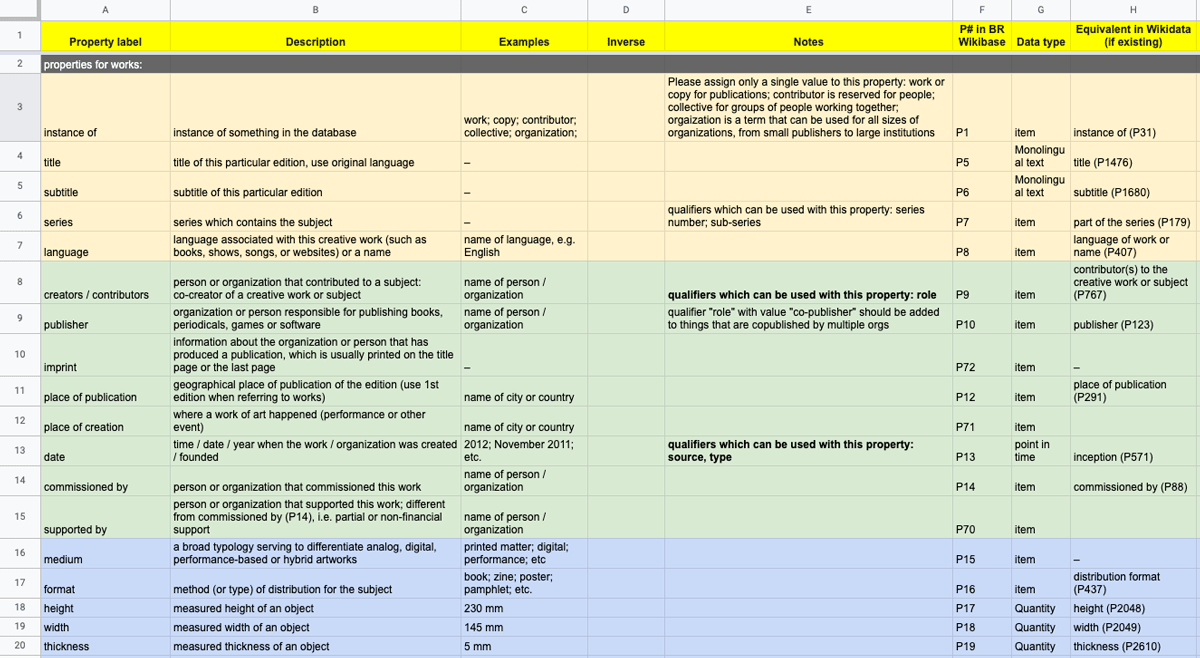
You may only use existing Properties (listed in the Data Model). This is important because we want the database to remain focused and workable. If you feel a Property is missing, please email us (daap [dot] community [at] disroot [dot] org) to discuss your ideas before adding a new one. You do not need to make use of all the Properties listed here. Choose only those Properties which are relevant to the Item you are creating. You are not required to add Statements in any specific order. However, the Data Model introduces one approach, of considering Statements in 5 sets relating to: 1. how the work is referred to in the world, e.g., its title, subtitle, language, and series number; 2. the publication event, e.g., creators/contributors, publisher, imprint, place and date of publication; 3. the material characteristics of the work, e.g., its medium, format, binding, height, width, thickness, and the material processes it comprises; 4. information about a work’s distribution, e.g., its digital facsimiles, distributor links, library links and ISBN; 5. and finally, anecdotal histories including description, distribution and exhibition history. You may also find it useful to consider this Example Item page which uses blank Values to demonstrate all Properties which can be used to describe different publication Items.
Step 1
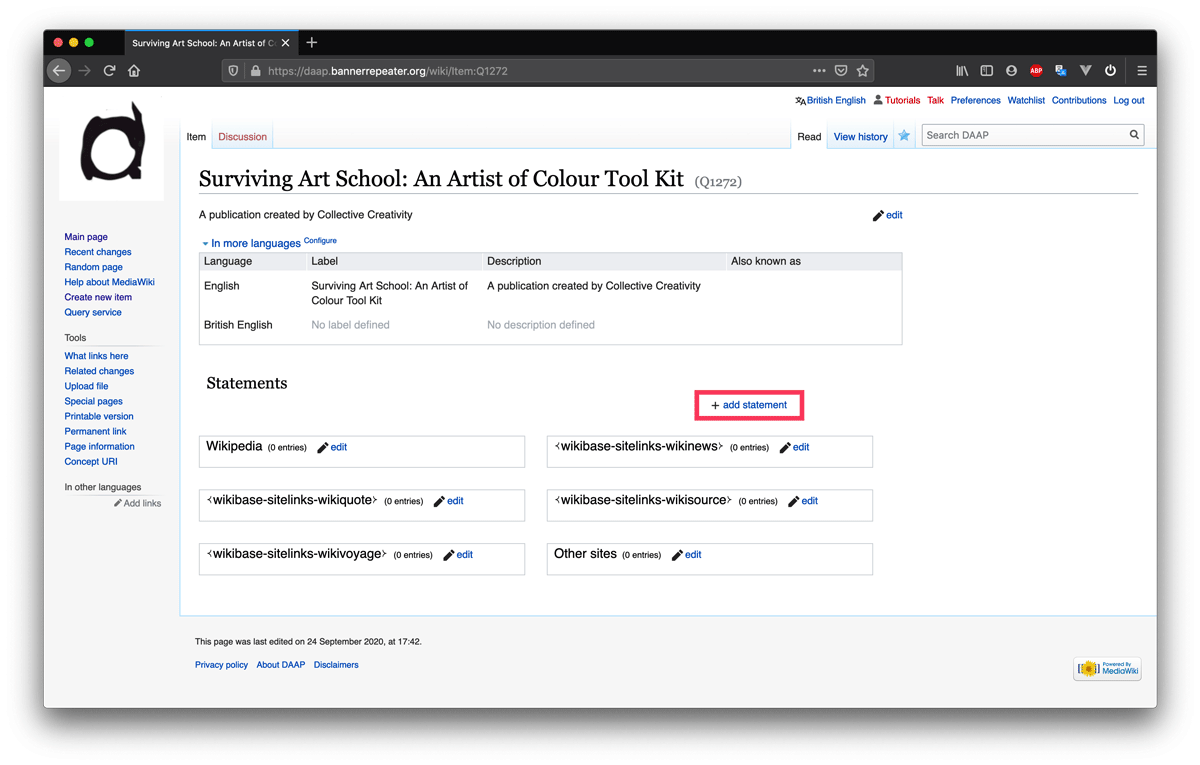
Now, to add statements to your Item page go to the page you have already created.
Click on “+ add statement”.
To add statements please use the existing properties. This is important. We intend to keep the properties to a limited list, to ensure workability. If you think a property is missing please consult with us before adding a new one.
There is no required order for how to add the different statements. Still, to know how to start you can have a look at another item in the database, or this example page that demonstrates a wide range of properties, to see how they are used.
Step 2
As we are adding the publication Surviving art school: an artist of colour tool kit we want to state that this item is a work (and not a person or a place). To do this we're going to add a statement that makes this clear. In order to specify what kind of item we're entering in the database we're going to use the property "instance of".
Start writing "instance of" in the box with the text "Property" and the box will auto-suggest this property for you, click on the suggestion to auto-complete the text.

Step 3
In the box to the right, we're going to enter the value that describes what kind of item ours is. In this case, as we are adding a publication we’ll set the value to "work".
All items that are things, like publications or artworks will have the value “work” and be an “instance of work”, as opposed to an instance of a person or a place.
Start writing "work" in the box following the property box we already set to “instance of”. The box will auto-suggest the value “work”. Click on the right suggestion to complete it automatically.

Step 4
Press save. You have now made your first statement.
Now that you know how to add a statement to your Item, we'll go through how to add other kinds of statements.
To add a statement about who the creators/artists/contributors are to your own Item you need to make sure an Item page for the person, or collective, already exists, else you need to create one for them.
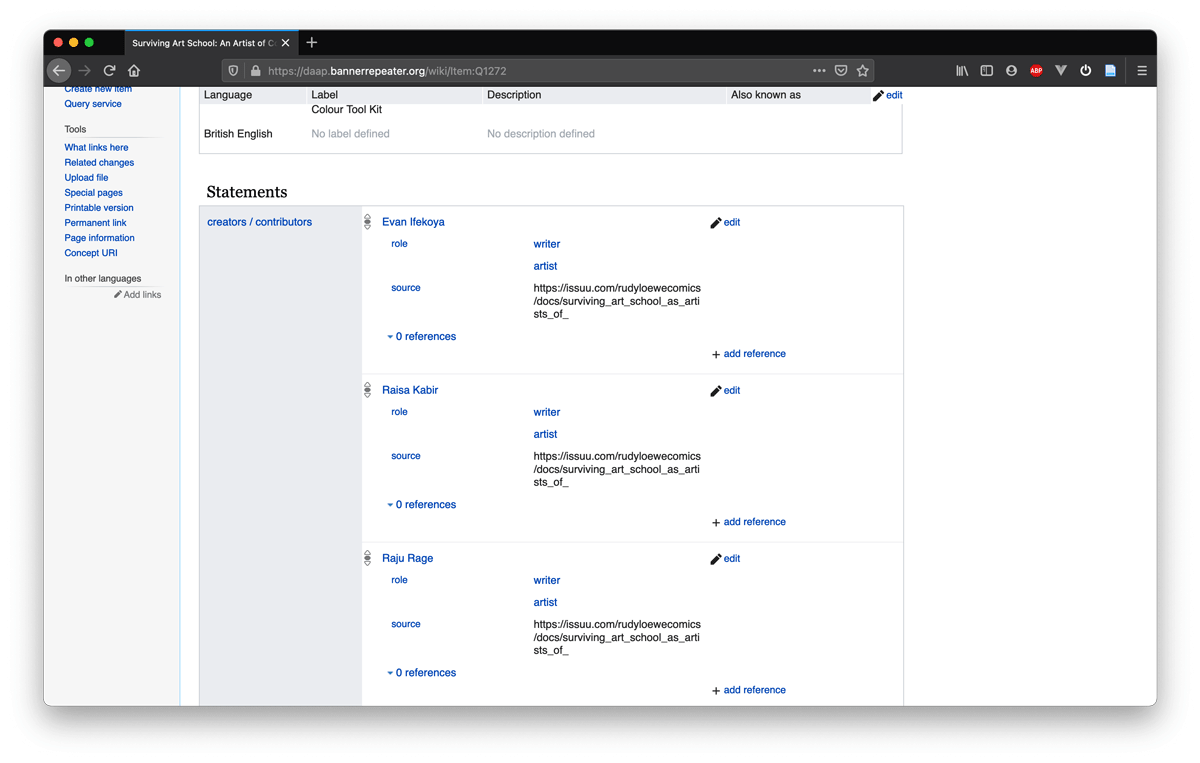
This is a process that you can repeat for adding an item for the publisher, the format, a specific binding method, etc. as needed.
To do so please follow the tutorial Create other items needed to describe a work.